Introduction
Technicians need reliable access to diagnostic information, service functions, and vehicle data to diagnose complex systems accurately. The right tool should deliver that access without adding bulk, cables, or complexity to the bay.
The INNOVAPRO™ SDS10 is a compact wireless diagnostic dongle, powered by RepairSolutionsPRO® (RSPRO®), that brings professional diagnostic capability to any compatible mobile device. Rather than carrying a standalone scan tool with its own screen and software, the SDS10 plugs directly into the vehicle’s OBD II port and connects wirelessly to the RSPRO® app - putting full diagnostic depth in the technician’s pocket.
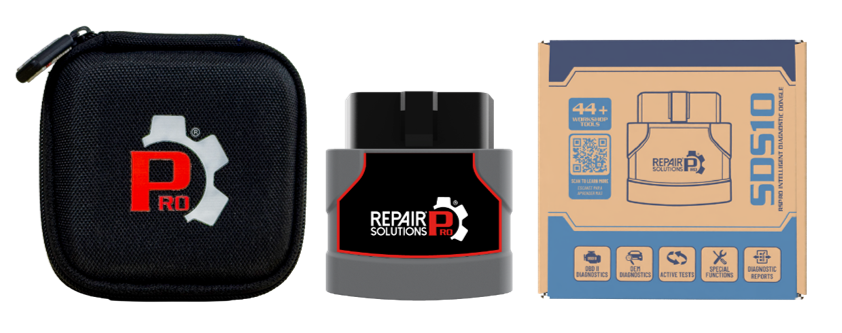
This article introduces the SDS10’s core capabilities for the RSPRO® technician community: setup and connectivity, the LED status indicator, OBD II and OEM-level diagnostics, bidirectional controls, workshop tool functions, security gateway access, and the repair information built into the RSPRO® app.
Quick Setup and Connectivity
Setting-up the SDS10 takes two steps: connect it to the vehicle, then pair it to the app. Insert the SDS10 into the vehicle’s 16-pin OBD II port, then open the RSPRO® app and pair the tool over Bluetooth. No cables, charging, or external power source are required - the SDS10 draws power directly from the OBD II port.
The SDS10 is compatible with both iOS and Android systems, on tablets and smartphones alike, so technicians can use the device already in their pocket or mounted in the bay.
| Connectivity Item | Detail |
Operating System | iOS 14+ or Android 6+ |
Connection | Bluetooth 5.2 |
Power Source | Vehicle OBD II port (no external power or charging required) |
Device Types | Smartphones and tablets |
Light Indicator
A built-in LED on the SDS10 gives technicians quick visual feedback without needing to check the app. At a glance, the LED communicates power status, pairing state, connection status, and firmware update progress.
| Tool Status | LED Behavior | Meaning |
Power On | ● Green Flash (1 time) | The SDS10 has powered on after being plugged into the OBD II port. |
Not Paired | ● Red Blink | The tool is powered but has not yet been paired to the RSPRO® app. |
Connected to App | ● Solid Green | The SDS10 is actively paired and connected to the RSPRO® app. |
Scanning / Erasing | ● Yellow Blink | The tool is actively performing a scan or clearing diagnostic data. |
USB Connected | ● Solid Yellow | The SDS10 is connected via USB (used for certain service operations). |
Firmware Update in Progress | ● Green Blink | A firmware update is currently being installed on the tool. Do not unplug. |
Sleep Mode | ● LED Off | The tool has entered a low-power state, typically after extended inactivity. |
10 OBD II Modes
The SDS10 provides access to all 10 standard OBD II diagnostic modes defined under SAE J1979, giving technicians the essential emissions and powertrain diagnostic data needed for day-to-day work. This includes monitor readiness status, the ability to clear emissions-related trouble codes after a repair, freeze frame data, live data streaming, Mode $06 on-board monitor test results, and vehicle information through Mode $09.
Monitor Status: View readiness status for all supported emissions monitors (Complete, Incomplete, or Not Supported).
Clear Codes: Clear emissions-related Diagnostic Trouble Codes (DTCs) after a repair is complete.
Freeze Frame Data: Review the snapshot of operating conditions captured at the moment a DTC was set.
Live Data: Stream real-time OBD II PIDs to confirm sensor and system behavior during diagnosis.
Mode $06 Results: Review on-board monitor test results for systems that have completed an evaluation.
Vehicle Information: Pull VIN, Calibration ID (CALID), Calibration Verification Number (CVN), and In-Use Performance Tracking (IUMPT) data via Mode $09.
OEM-Level Diagnostics
Beyond the standardized OBD II mode set, the SDS10 provides all-system diagnostic access to read and erase OEM-specific Diagnostic Trouble Codes across supported vehicle systems, including ECM/PCM, and TCM. This extends fault visibility well beyond basic OBD II codes, helping technicians identify, review, and analyze issues across the full vehicle - not just the powertrain.
OEM-level diagnostics on the SDS10 also include detailed PID data and intuitive graph displays that help technicians visualize system behavior in real time and verify that a repair resolved the underlying issue.
Bidirectional Controls on Supported Systems Active Tests
The SDS10 includes Active Tests and Special Functions for supported systems, including ECM/PCM, and TCM available for 7 vehicle makes - Chrysler, GM, Ford, Hyundai, Nissan, Toyota, and Honda. These bidirectional functions let the SDS10 send commands to vehicle modules - not just read data from them - enabling diagnostic and service work that goes beyond standard code retrieval.
All-System Diagnostics: Read and clear codes across ECM/PCM, and TCM.
Enhanced Live Data: Stream OEM-level real-time data across supported systems for deeper diagnostic insight.
Active Tests
Active tests give technicians a direct way to evaluate system response on compatible vehicles and systems. By commanding components and monitoring live feedback, technicians can confirm whether a system responds correctly during testing and use the results to guide fault diagnosis - rather than relying on stored codes alone.
How Active Tests Help Diagnose Faults: Command a specific component, observe how the system responds in real time, and confirm correct operation before moving forward with a repair. This closes the loop between suspected fault and confirmed cause.
Special Functions
Special Functions provide the ability to perform diagnostic and calibration procedures for vehicle control modules — including the ECM/PCM, and TCM. This feature makes vehicle components and control modules synchronize together after a repair or replacement, resets the control module, or performs vital operations that directly affect vehicle performance.
Security Gateway
For vehicles equipped with protected networks, the SDS10 supports unlocking Security Gateway access for select FCA and Nissan vehicles, with Ford ECU Security Access available where applicable. This allows authorized diagnostic and service procedures to be performed on vehicles that would otherwise restrict standard OBD II tool access.
NOTE: Security Gateway and ECU Security Access apply only to supported makes and models. Always confirm vehicle-specific compatibility before attempting a protected-network procedure.
Workshop Tools
The SDS10 offers 14 Workshop tools that support common service and maintenance procedures right in the bay. Technicians can perform resets, relearns, routines, and calibrations, along with service-related checks. These functions support routine maintenance, component replacement, and post-repair service procedures - all from the same tool used for diagnostics.
Resets: Restore a system to its default or expected operating state after service.
Relearns: Re-teach a module the correct baseline values after a part replacement.
Routines: Execute structured service procedures that require the tool to actively command or monitor a system during a maintenance operation.
Calibrations: Align sensor or system output with the vehicle's expected reference values after installation or adjustment.
RSPRO® App Features
Beyond hardware-driven diagnostics, the RSPRO® app delivers repair-related information that helps close the loop between fault and fix. This includes Verified Fixes, Technical Service Bulletins (TSBs), Technicians’ Comments, and Repair Tips. Built directly into the diagnostic workflow, this content helps reduce diagnostic time and supports more confident repair decisions.
Verified Fixes: Repair solutions confirmed effective by other technicians for the same fault.
Technical Service Bulletins: OEM-issued guidance relevant to the vehicle and fault being diagnosed.
Technicians’ Comments: Field insights shared by other professional technicians who have worked the same issue.
Repair Tips: Practical guidance to support an efficient, accurate vehicle repair and fault-diagnosis.
Conclusion
The INNOVAPRO™ SDS10, powered by RSPRO®, brings OBD II and OEM-level diagnostics, bidirectional controls, service functions, and repair information into one compact wireless solution. From quick Bluetooth setup and an at-a-glance LED indicator, to all-system diagnostics, Active Tests, Special Functions, Security Gateway access, and 14 Workshop Tools, the SDS10 is built to support the full range of diagnostic and service work in a professional shop - all from the mobile device already in the technician’s pocket.
Disclaimer
This content is subject to change without notice. The information has been carefully reviewed and is believed to be accurate based on our research and findings. It is intended as a guide, not a definitive procedure. We accept no responsibility for inaccuracies. Vehicle-specific test settings may be required.
Copyright 2026 IEC. All rights reserved.

