Introduction
Description: The Innova SDS50 Smart Diagnostic System (SDS) Tech lets you view your Vehicle Information. This function provides a variety of information about your vehicle, such as its VIN (Vehicle Identification Number), Manufacturer, Model, Engine, Control Module Identification Number, and other relevant details. This information can be helpful for vehicle owners, as well as Technicians or garages, to diagnose problems, make informed decisions about repairs, and keep vehicles running smoothly. This article will explain how to view your Vehicle Information while using the Innova SDS50.
Benefits: This article will explain how to view your Vehicle Information while using the Innova SDS50.
Instructions
Note: This procedure is carried out on the 2010 Mitsubishi Outlander.
Note: The system name and function procedure differ depending on the manufacturer and model of the vehicle.
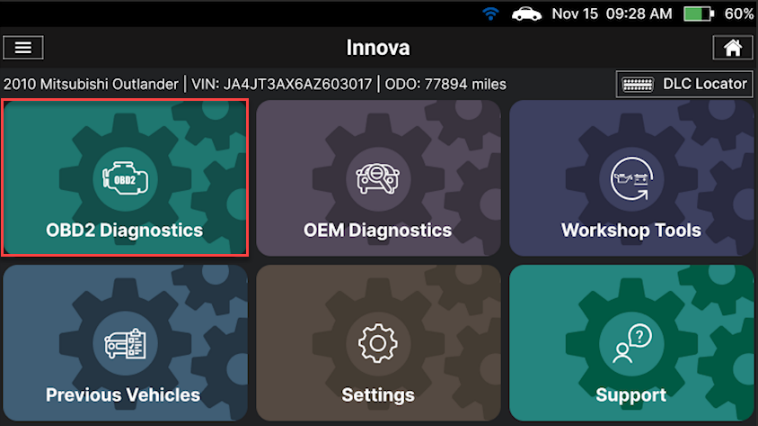
Step 1: Connect the Innova SDS50 to the vehicle via the 16-pin Data Link Connector (DLC). Wait a moment for the AUTO-LINK process to be completed. After retrieving, the Innova SDS50 gets general information such as VIN, vehicle information, and odometer. Next, select the OBD-II Diagnostics section.
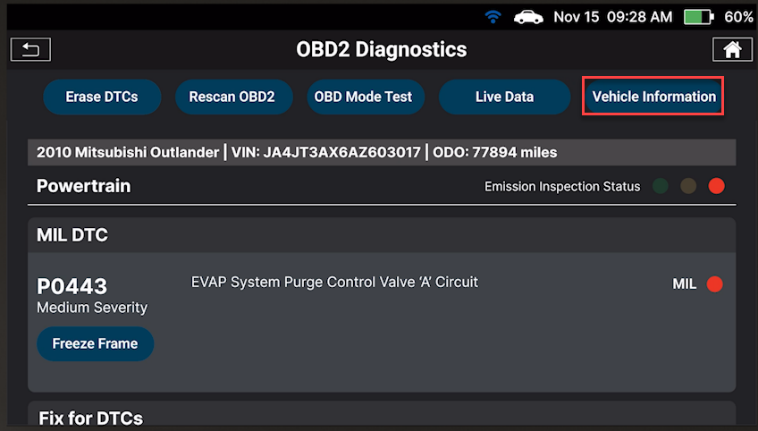
Step 2: Tap the Vehicle Information button to view the vehicle information. The Vehicle Information section has four types of information, including Additional Vehicle Information, Vehicle ID, Available Module, and In-Use Performance Tracking (IPT). Scroll to view each section.
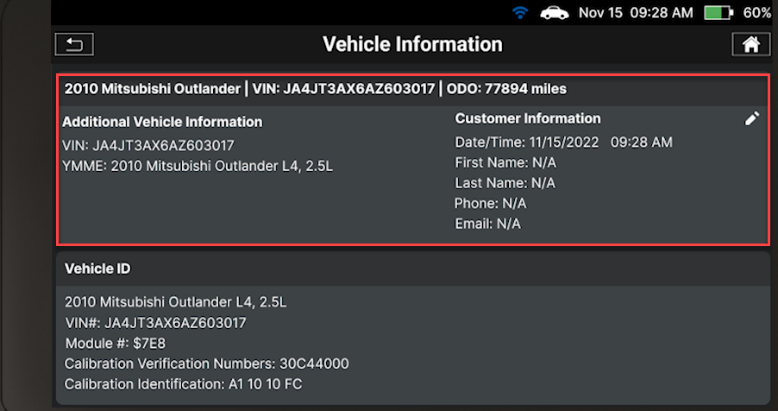
1. The Additional Vehicle Information
Additional Vehicle Information offers basic information such as the VIN, Year, Manufacturer, Model, Engine, and more information about the vehicle.
The VIN is valuable information for auto repairers, helping them to order the correct parts, access warranty information, check for recalls, and access a vehicle's history. By using the VIN, auto repairers can make informed decisions about repairs and maintenance, ensuring that the vehicle is safe and reliable for the customer.
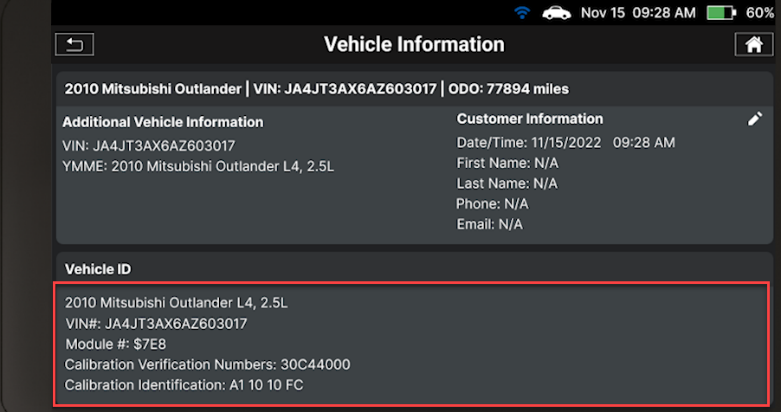
2. The Vehicle ID
The Vehicle ID section displays the Vehicle Calibration Identification Number (Cal ID) and Calibration Verification Number (CVN). The Cal ID uniquely identifies the software version for the vehicle’s control module. The CVNs are used to determine if emission-related calibrations for the vehicle under test have been changed. One or more CVNs may be returned by the vehicle's computer.
The Cal ID and CVN are important codes used to identify and verify the calibration of a vehicle's Engine Control Module (ECM). By using these codes, auto repairers can verify that the correct calibration is loaded into the ECM, reprogram the ECM if necessary, and make informed decisions about warranty claims for engine-related issues.
3. Available Modules
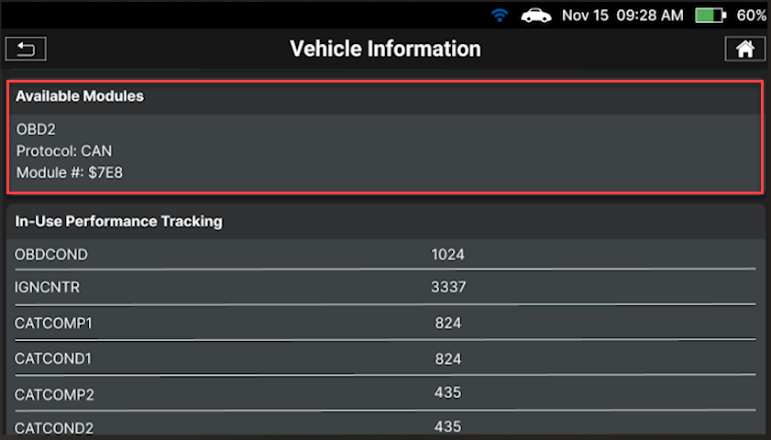
The Innova SDS50 will show details of the protocol and Electronic Control Unit (ECU) address of the responding ECU that established communication with the Innova SDS50.
It helps to streamline the repair process, save time and money, and improve the quality of repairs, which can be very beneficial for those who repair cars.
4. In-Use Performance Tracking
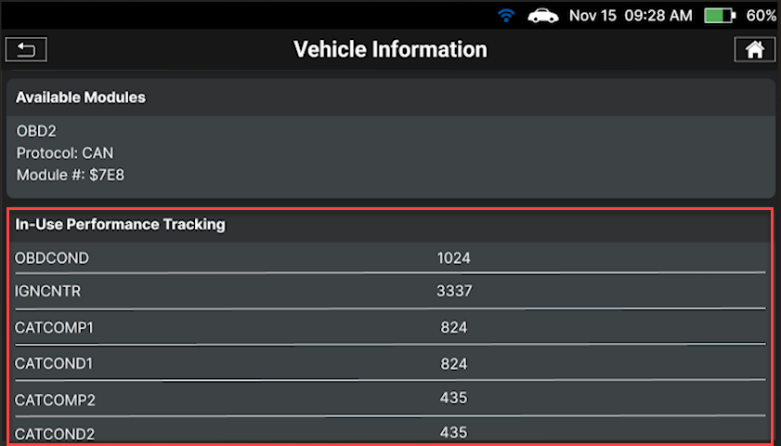
The Innova SDS50 can retrieve In-Use Performance Tracking (IPT) statistics for monitors supported by the vehicle under test. Two values are returned for each monitor: the number of times that all conditions necessary for a specific monitor to detect a malfunction have been encountered (XXXCOND) and the number of times that the vehicle has been operated under the specific conditions for the monitor (XXXCOMP). Statistics are also provided for the number of times the vehicle has been operated in OBD Monitoring Conditions (OBDCOND) and the number of times the vehicle’s engine has been started (IGNCNTR).
- In-Use Performance Tracking for Spark Ignition Engines: It provides information about tracking in-use performance for Catalyst banks, Oxygen Sensor banks, Evaporative Leak Detection Systems, EGR (Exhaust Gas Recirculation) systems, and Secondary Air Systems.
- In-Use Performance Tracking for Compression Ignition Engines: It provides information about tracking in-use performance for NMHC (Non-Methane Hydrocarbon) Catalyst, NOx Catalyst monitor, NOx Adsorber monitors, Exhaust Gas Sensor monitor, EGR monitor, Boost Pressure monitor, and Fuel System monitor.
Related Articles
- Innova SDS50: How to perform Special Function feature: link
- Innova SDS50: How to perform the Steering Angle Sensor Calibration feature: link
- Innova SDS50: How to perform the Battery Test feature: link

